
Grab your coffee, pull up a chair, and prepare yourself for a little Halloween magic!
Today we're turning an ordinary piece of cardstock into an adorable Halloween treat box. No bubbling cauldrons, mysterious potions, or complicated spells required. Just a few cuts, some score lines, a little glue, and a rather cheerful ghost who appears to have helped himself to the Halloween candy.
Honestly, you can't leave these little ghosts alone for five minutes.
And because this is The Paper Artist, we're not stopping at simply making a treat box. We're going to have a little fun with digital crafting, too!
I'll show you how I used Adobe Express to customize my Polkadoodles printables, create a moon, add a sentiment, and turn a flat printable into a dimensional Halloween scene.
Don't worry if digital crafting is new to you. We're keeping things simple.
And yes, there will be candy.
Well... sort of. More about that later!
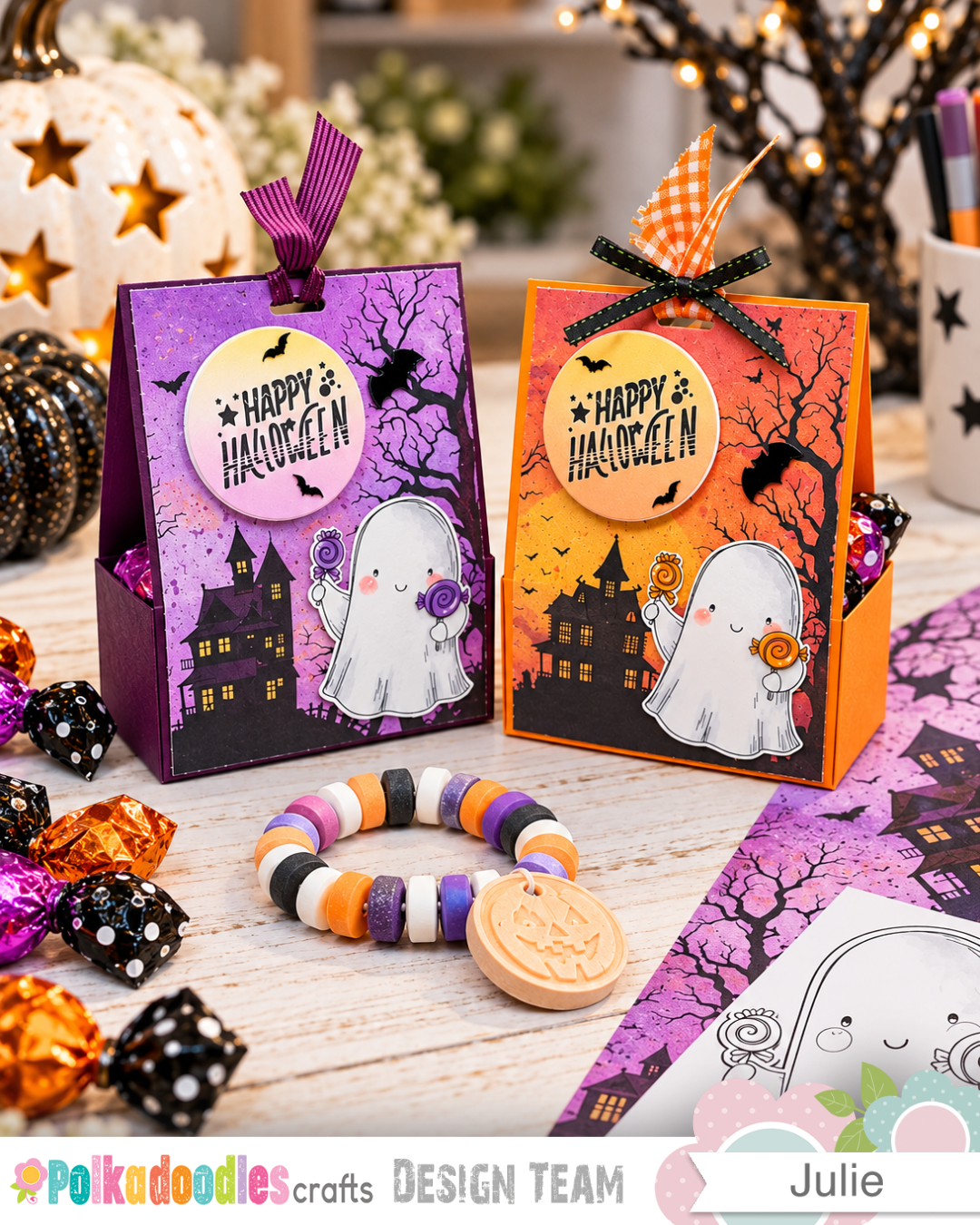
First, Let's Gather Our Halloween Supplies!
For this project, I used three fabulous Polkadoodles digital products:
Creepy Autumn Halloween paper
Our adorable little ghost
The Happy Halloween sentiment - Ghastly Ghost Halloween
You'll also need:
Colored cardstock — I used orange and purple
Paper trimmer and scoring board
Scissors
Strong liquid glue
Foam tape
Copic markers or your favorite coloring medium
A circle die for cutting the moon
Ribbon and a suitable punch for the ribbon opening
Optional bat embellishments, sparkly gems, or other Halloween decorations
Halloween treats to fill your finished box
And, of course, a computer and printer for our little digital adventure.
Step 1: Let's Make a Box Appear!
Our magic spell begins with one piece of cardstock.
Cut your cardstock to 6" × 9½".
Place the cardstock in your scoring board with the 6" side across the top.
Score at:
1½" and 4½"
Now turn your cardstock so the 9½" side is across the top.
Score at:
2½", 4", 5½", and 7"
That's it for the scoring!
So far, we've turned a perfectly innocent piece of cardstock into a piece of cardstock with a whole lot of lines on it.
Not terribly impressive magic just yet, but stay with me.
Step 2: A Little Snip Here, a Little Snip There
Now comes the cutting.
Using the photograph below as your guide, cut away the unnecessary sections of cardstock to create the box template.
You'll notice that I've also trimmed the edges of the tabs at a slight angle.
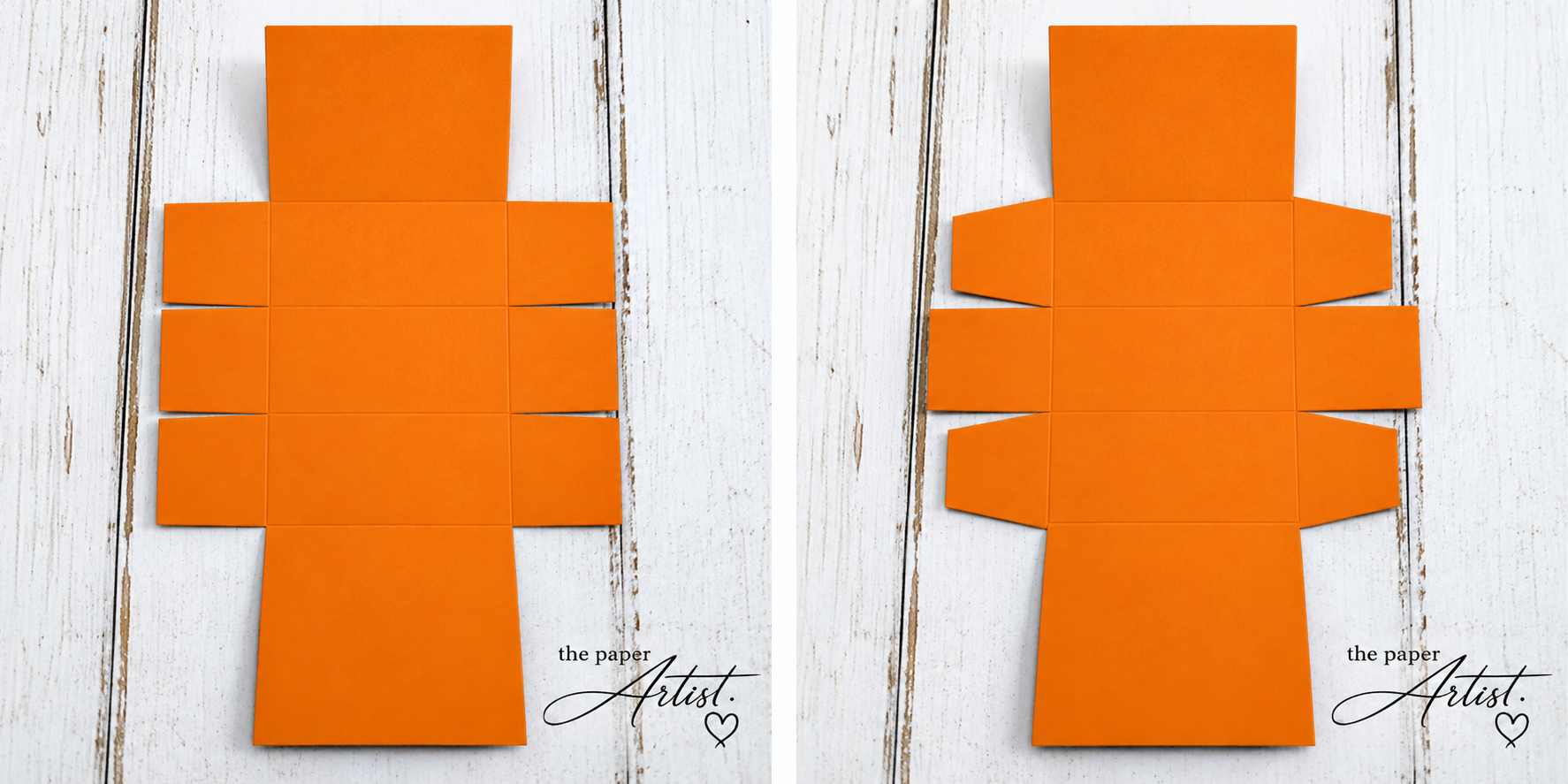
Tip: Trimming those tabs slightly makes them easier to fold into position and helps prevent bulky corners when assembling your box.
Once you've finished cutting, fold along your score lines and give each fold a good crease.
Now we're ready for the glue!
Step 3: Abracadabra! We Have a Box!
With all the tabs cut and trimmed, assembling the treat holder is quite straightforward.
Fold the cardstock into its box shape, bringing the appropriate tabs together and securing them with strong liquid glue.
I recommend using a good-quality liquid adhesive for this project. After all, we're making a treat holder, and we don't want the bottom falling out just as someone discovers what's inside!
Hold the glued sections together until the adhesive has a good grip.
The finished holder has a little pocket at the bottom to hold your treats, with a taller panel that we'll decorate.
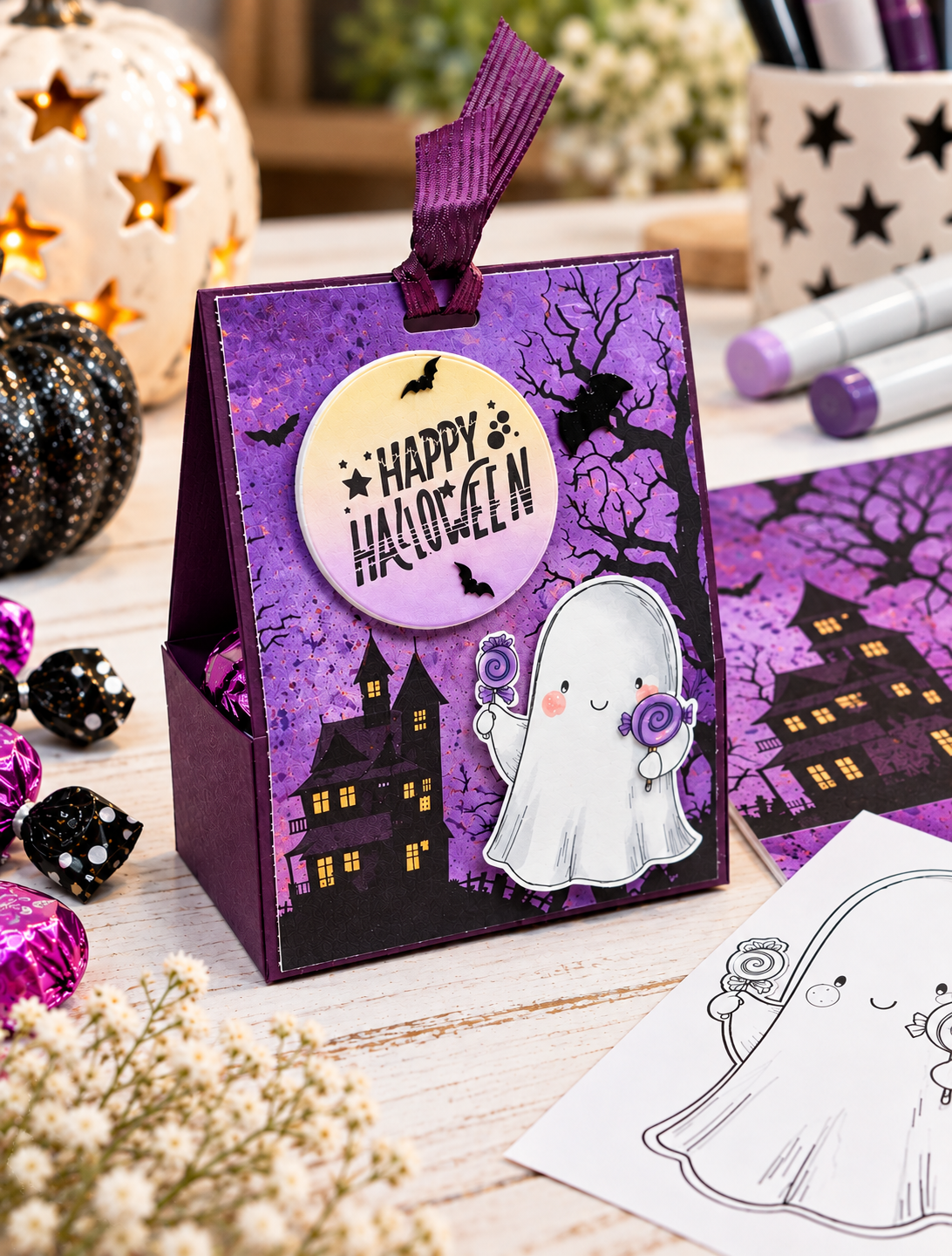
And there we have it!
One Halloween treat box.
Well, technically, one undecorated Halloween treat box.
We can't possibly leave it like that.
Step 4: A Little Digital Halloween Magic!
Now comes one of my favourite parts of this project.
We're going to create our Halloween scene using digital crafting supplies.
I use Adobe Express for my digital crafting. Some crafters prefer Canva or other editing programs, and that's perfectly fine. The instructions I'm sharing here are specifically for Adobe Express because that's the program I use.
If you've never tried customizing digital papers and images before, this is a lovely little project to experiment with.
You don't need to be an expert.
You just need to be willing to click a few buttons and see what happens.
That's pretty much how most of my adventures begin anyway!
Creating the Halloween Background
I started with a beautiful spooky printable paper from Polkadoodles.
The background features a haunted house, bare trees, and all those wonderful Halloween details that make a scene feel just a little mysterious.
I brought the paper into Adobe Express and adjusted the design to suit my project.
My finished printable background measures 2⅞" × 3⅞".
This size fits nicely on the front of the treat holder while leaving a small border of coloured cardstock visible.
But I wanted to add something extra.
A moon!
And not just any moon.
A moon with a Halloween greeting floating right in the middle.
How to Create the Moon in Adobe Express
Here's how I did it.
Open your project in Adobe Express and add your background paper to the canvas.
Choose a circle shape from the available shapes.
Position the circle where you'd like your moon to appear.
Change the circle's color to coordinate with your Halloween background.
Select the gradient color option to give the moon a softer, blended appearance.
Add your Halloween sentiment and position it in the center of the circle.
Adjust the size and placement until you're happy with the finished look.
And just like that, you've created your own coordinating Halloween moon!
No moon-shaped stamp required.
No complicated coloring technique.
Just a circle, a little color, and a few clicks.
Tip: Try using colors already found in your background paper when creating your gradient. It helps the finished design look coordinated rather than having a random circle floating around in the sky.
Although, admittedly, Halloween is probably the one time of year when a random floating object wouldn't raise too many questions.
Step 5: Now You See the Ghost... Now You Don't!
This is where our digital magic gets particularly interesting.
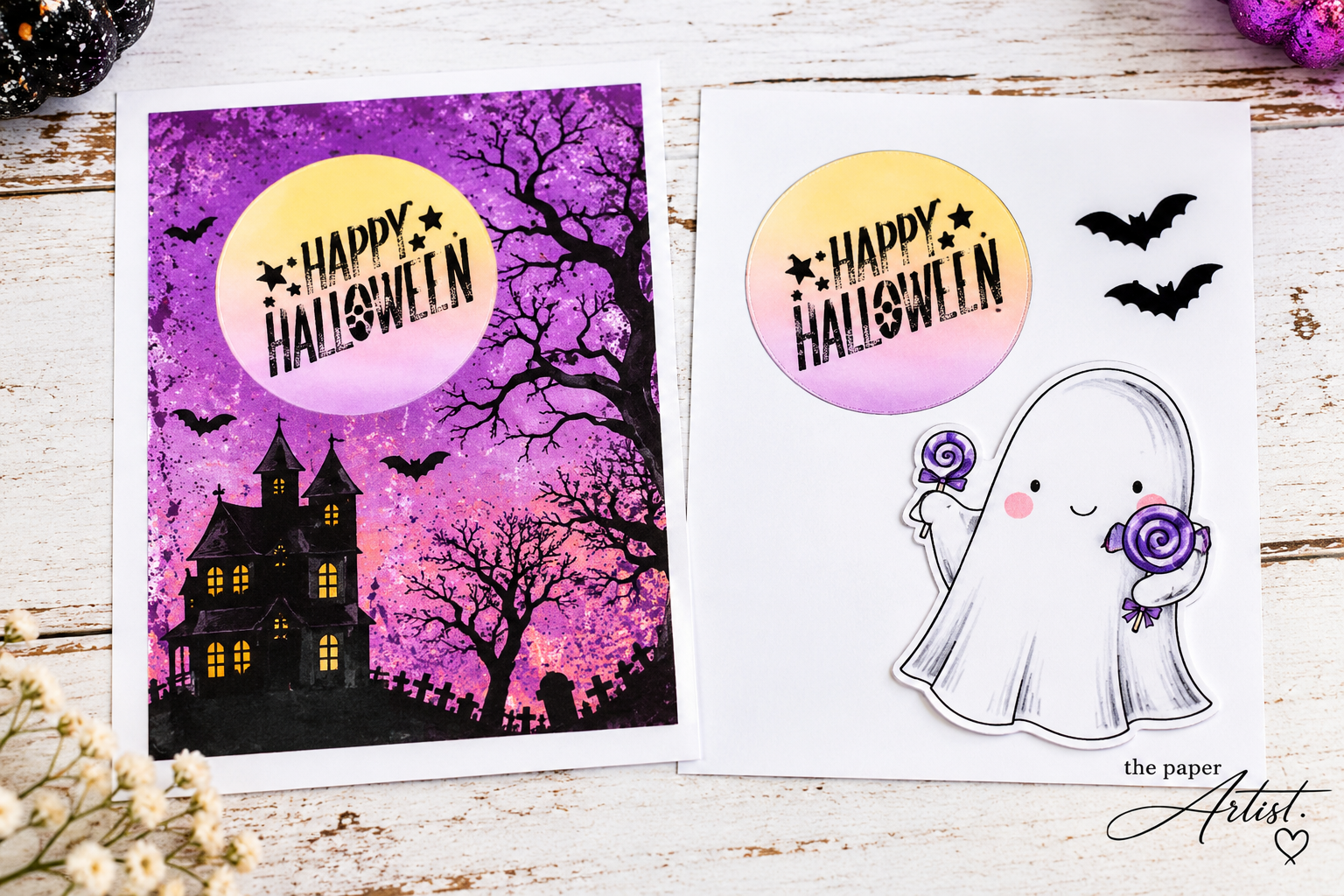
We're going to create two printable versions of our design.
Why two?
Because we want to give our finished project some dimension instead of having everything printed flat on one piece of paper.
And here's a little trick that makes the process surprisingly easy.
First, Create Your Complete Scene
With your background and moon in place, add your Polkadoodles ghost image to the canvas.
Resize the ghost and position him exactly where you'd like him to appear on the finished project.
Take your time with this part.
You want to make sure the ghost, moon, and background all work nicely together.
Once you're happy with the arrangement, we're ready to perform our disappearing act!
Printable Number One — The Background
Select your ghost image.
Delete him from the canvas.
Poof!
Our little ghost has vanished!
Don't worry. We haven't lost him forever.
Print this version of your design, which now contains the Halloween background and moon without the ghost.
This will become the main decorative panel for your treat box.
Printable Number Two — The Embellishments
Now return to your Adobe Express canvas.
Click the Undo button.
And just like magic, our ghost reappears in exactly the same position!
Next, remove the background paper from the canvas, leaving the ghost and the moon with its sentiment.
Print this version.
Abracadabra!
You now have the two printed versions needed to create your dimensional Halloween scene!
Why This Little Trick Is So Useful
Here's the best part.
Because we arranged everything together before printing, our ghost and moon are already sized to coordinate with the background.
There's no guessing how large the ghost should be.
No printing him three times because the first two were too big.
And no trying to remember exactly where you placed everything.
It's all been worked out on the canvas before you ever pick up your scissors.
You can use this same technique for greeting cards, scrapbook pages, gift tags, notebook covers, and all sorts of other paper-crafting projects.
Digital crafting doesn't replace traditional crafting. It simply gives us another way to play with our supplies!
And I happen to think that's pretty wonderful.
Step 6: Bringing Our Little Ghost to Life
Now that our printables are ready, it's time to return to the craft desk.
I colored my little ghost using Copic markers, adding some gentle shading and color to his candy.
Then I fussy cut around the image.
I also used a coordinating circle die to cut out the printed moon and sentiment from the embellishment copy.
Now we have three important pieces:
Our Halloween background panel
Our colored and fussy-cut ghost
Our coordinating moon and sentiment
Adding Dimension
Using foam tape, attach the cut-out moon over the moon printed on your background panel.
Then add your little ghost using foam tape as well.
This lifts the embellishments slightly away from the background and gives the scene a lovely dimensional appearance.
It's such a simple technique, but it makes a noticeable difference to the finished project.
And let's face it, our little ghost deserves to stand out.
He's been very patient through all this disappearing and reappearing business.
Step 7: Finishing Our Halloween Treat Holder
With our dimensional scene complete, attach the decorated panel to the front of the assembled box.
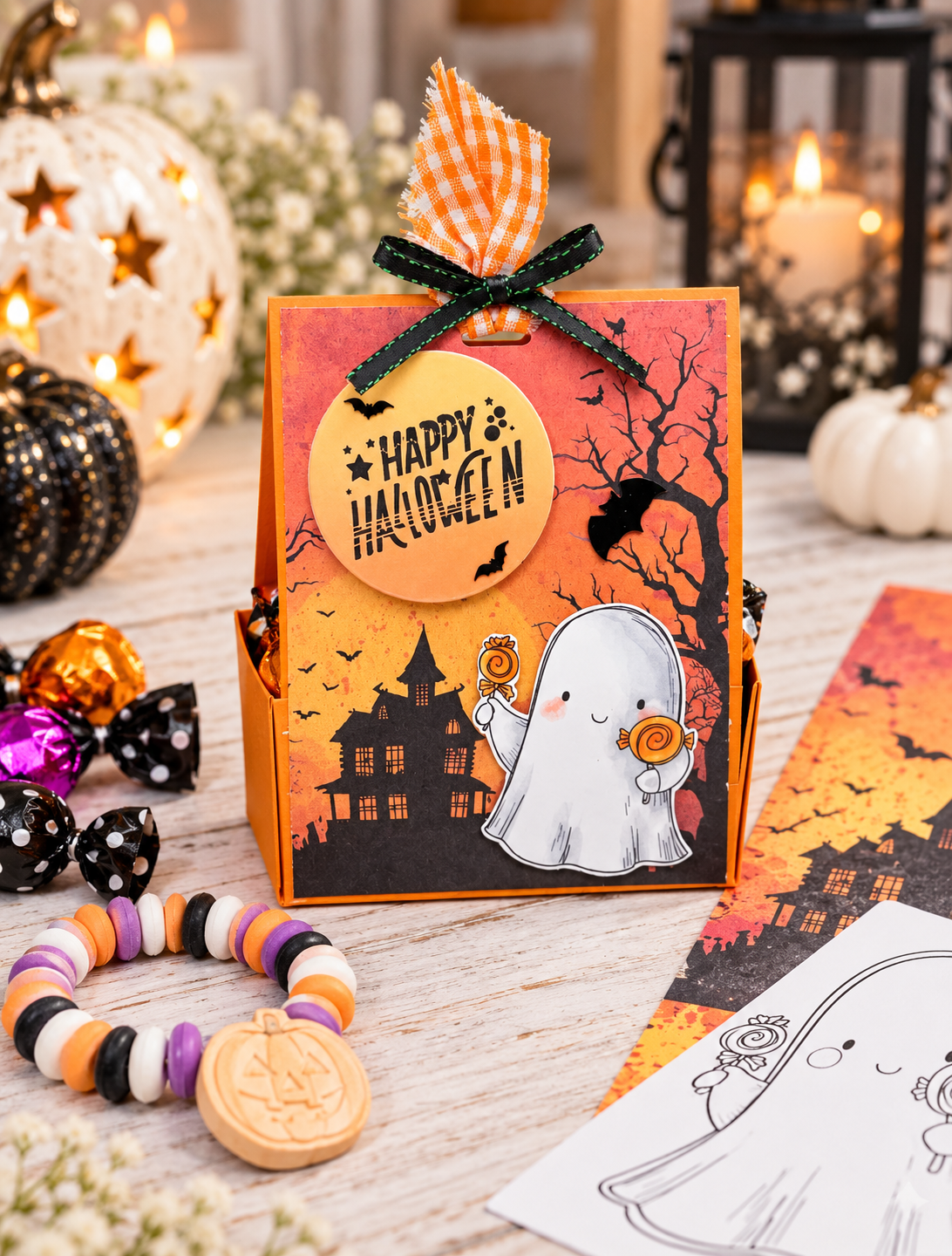
I added a few little bat embellishments to give the design some extra Halloween personality.
You could also add sparkly gems, tiny stars, or other coordinating decorations.
For the finishing touch, I added ribbon through an opening at the top of the holder.
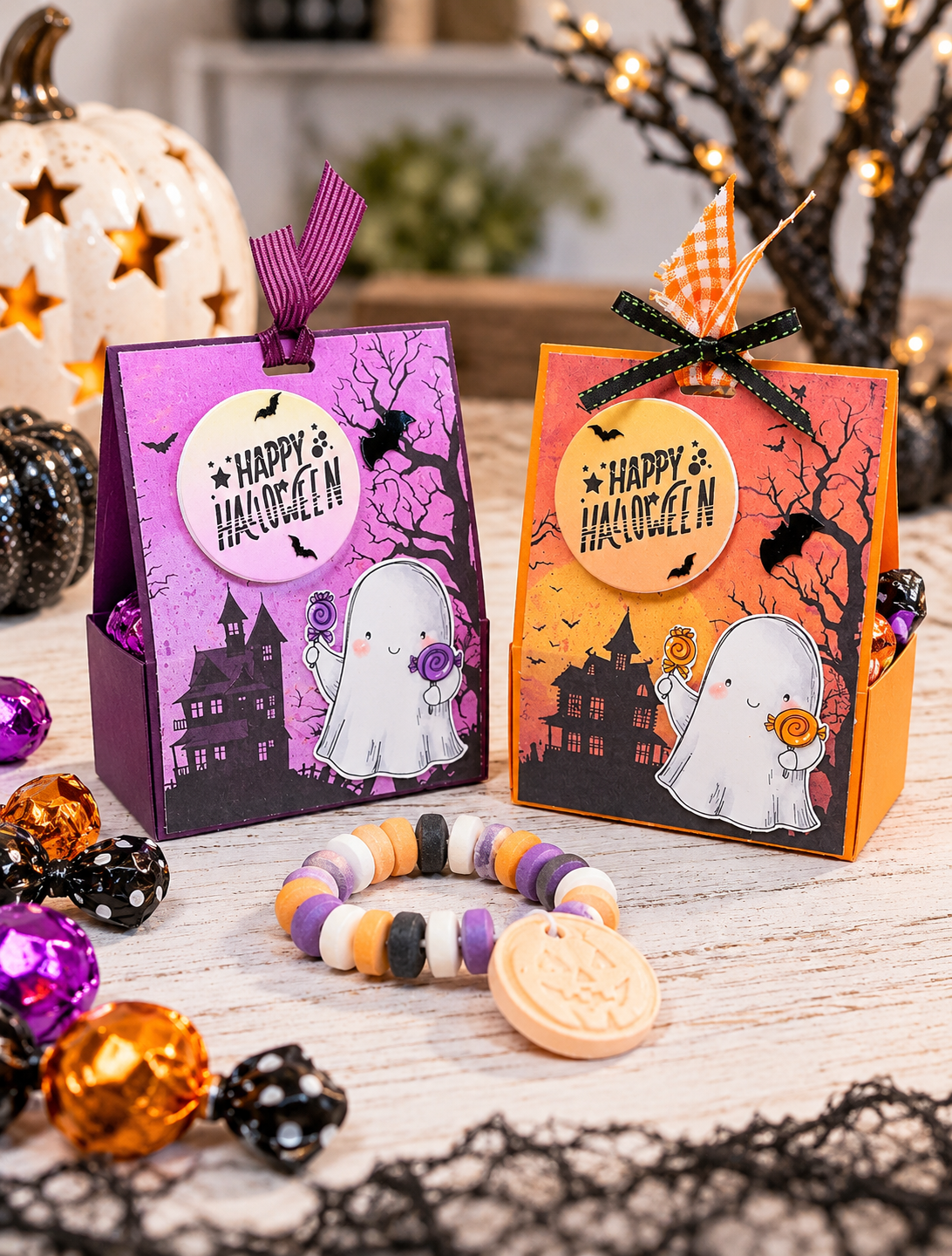
The purple version has a lovely coordinating purple ribbon, while the orange version features a cheerful orange gingham ribbon finished with a black bow.
Same basic project.
Two completely different Halloween looks!
And Now... What Shall We Put Inside?
Well, this is me.
And if you've been following along with my recent crafting adventures, you'll know that beads have been appearing on my desk with alarming regularity.
So naturally, when it came time to fill these Halloween treat holders, I had a rather obvious idea.
Candy bracelets!
Because really, what else would I be handing out for Halloween?
Ordinary candy?
When I could hand out candy that doubles as a bracelet?
I think not!
These little boxes are a fun way to package Halloween treats, whether you're filling them with candy, small surprises, or something handmade.
Wondering how beads took over my craft room? Take a peek at some of the Bead Dynasty adventures. Apparently, paper crafting wasn't expensive enough!
A Few Spooky Little Secrets Before You Go
Before you head off to make your own Halloween treat boxes, here are a few things worth remembering.
Use strong glue. A treat box needs to hold together, especially once you've filled it.
Trim those tabs. Slightly angled tabs make assembling the box easier and help keep the corners neat.
Plan your digital scene before printing. Getting the sizing and placement right on your canvas saves paper, ink, and frustration.
Don't be afraid to customize your printables. Changing colours, adding shapes, and layering images opens up all sorts of creative possibilities.
And most importantly, have fun with it!
You don't need fancy equipment or complicated techniques to create something special.
Sometimes all it takes is a piece of cardstock, a few digital images, and the willingness to try something new.
But Wait... The Magic Doesn't End at Halloween!
With Halloween just around the corner, you might be thinking there isn't much time left to make these little treat holders.
Well, here's the wonderful thing about paper crafting. A good project doesn't have to disappear when the holiday is over!
Why not give this same design a little winter makeover?
Imagine a beautiful snowy background, your favourite snowman image, and a cheerful winter sentiment. Or bring out those Christmas papers, add a jolly Santa or adorable gingerbread character, and suddenly you've got the cutest little Christmas treat holders!
Fill them with chocolates, candy canes, small handmade gifts, or perhaps a little bracelet tucked inside.
The measurements and construction stay exactly the same. Simply change your papers, images, and colors to suit the occasion.
And remember that little Adobe Express trick we learned? It works just as beautifully with winter and Christmas designs!
One little box, endless possibilities, and absolutely no need to put away your magic wand just because Halloween is over!
The Final Magic Spell
And there we have it!
We started with a piece of cardstock, added a little Polkadoodles Halloween magic, performed a disappearing ghost trick in Adobe Express, and ended up with two adorable treat holders ready for Halloween.
Not bad for an afternoon at the craft desk!
I hope this project inspires you to try making your own treat boxes and perhaps experiment with customizing your digital printables along the way.
And if you've never tried digital crafting before, give it a go!
You might be surprised by what you can create.
Just remember...
Abracadabra! A little cutting, a little coloring, a dab of glue, and a whole lot of Halloween fun!
Happy Halloween and happy crafting!
Julie — The Paper Artist
Where the coffee is hot, beads are everywhere, and there's always one more project waiting to happen!
